
Spell check
Blank can underline the words it doesn't know with a wavy line, so a typo never slips into your finished piece. Spell check is off until you turn it on: some writers like a clean page while drafting and only proofread at the end.
Turn it on
Press Mod Alt S, or right-click anywhere in the text and choose Enable Spell Check. Press the shortcut again, or click Spelling at the bottom right, to turn it off. Blank remembers your choice.
Blank checks the language shown at the bottom right. A word is checked once you finish it, so nothing is underlined while you are still typing it.
Fix a word
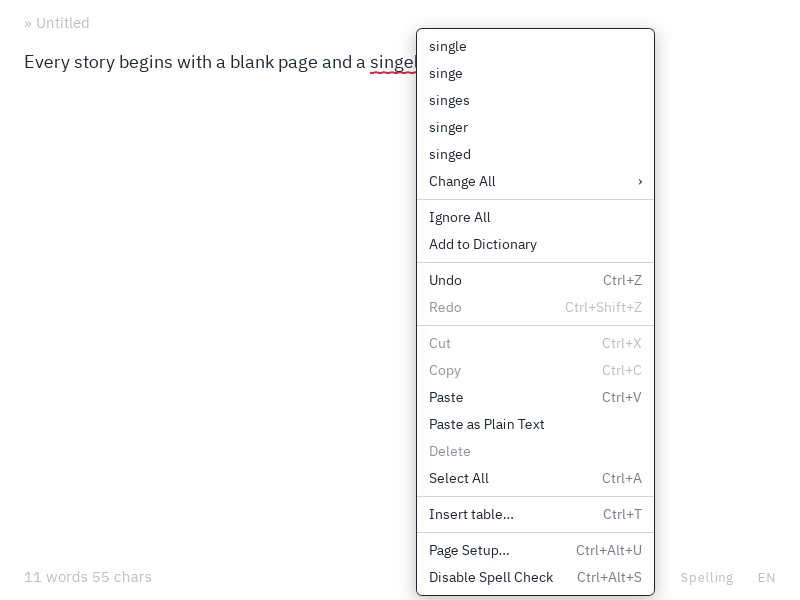
Right-click a word with a wavy line, or press Mod Alt N to jump to the next one, and choose what to do:
| Menu item | What it does |
|---|---|
| A suggestion | Replaces the word. Capitals are kept, so Teh becomes The. Mod Z undoes it. |
| Change All ▸ a suggestion | Replaces the word everywhere in the document, in one step you can undo. |
| Ignore All | Stops underlining the word in this document until you open or start another one. |
| Add to Dictionary | Accepts the word from now on, in every document. |
Right-click a word you added to change your mind:
| Menu item | What it does |
|---|---|
| Remove from Dictionary | Underlines the word again. |
| Edit in Dictionary… | Lets you correct the word you added, e.g. Kubernets to Kubernetes. |
The menu also has the usual editing commands: undo and redo, cut, copy, paste, paste as plain text, delete and select all. Hold Shift while you right-click for the system's own menu.
Use the keyboard
| Command | Shortcut |
|---|---|
| Turn spell check on or off | Mod Alt S |
| Next misspelled word | Mod Alt N |
| Previous misspelled word | Mod Alt Shift N |
| Open the menu at the cursor | Shift F10 or the menu key |
In the menu, ↑ / ↓ move, Enter chooses, → opens a submenu and Esc closes it. Typing a letter jumps to the next item that starts with it.
What isn't checked
- code, both inline and in code blocks
- web and email addresses
- words in capitals, like NASA, and words with digits, like mp3. You can check them too.
Languages
Blank checks spelling in about 80 languages and regional variants. The dictionaries for English (US), German, French and Spanish come with Blank. Any other one is downloaded the first time you check a text in that language, while the bottom right shows Spelling and the progress, and kept for offline use from then on.
To check a regional variant, type its code in the language chooser: engb for British English, dech for Swiss German, ptpt for Portuguese as written in Portugal, esmx for Mexican Spanish and so on. British, Canadian and Australian English, Austrian and Swiss German, and Portugal's Portuguese are also in the list you step through with ← / →.
There is no dictionary for Finnish yet, and none that works for Turkish, Armenian, Latin, Mongolian, Nepali and Interlingua. For these, the bottom right shows No spelling.
Where the dictionaries come from
Blank uses the Hunspell dictionaries collected at wooorm/dictionaries, each under its own open-source license. They are downloaded from the jsDelivr CDN, with unpkg as a fallback, and checked against a fingerprint built into Blank before they are used. Blank asks for nothing else, and your text never leaves your computer.
Your dictionary
The words you add are kept in plain text files in the app config folder, one per language, e.g. dictionaries/de.txt for German, Austrian and Swiss German. Each line holds one word. You can edit, sync or back up these files; Blank reads them when you turn spell check on, change the language or start it.
A word added in lowercase is also accepted with a capital or in capitals: blank accepts Blank and BLANK. A word with capitals is accepted as written or in capitals: iPhone accepts IPHONE, but not Iphone.